
For accounting firms & tax departments

Software for Accounting Firms & Tax File Management

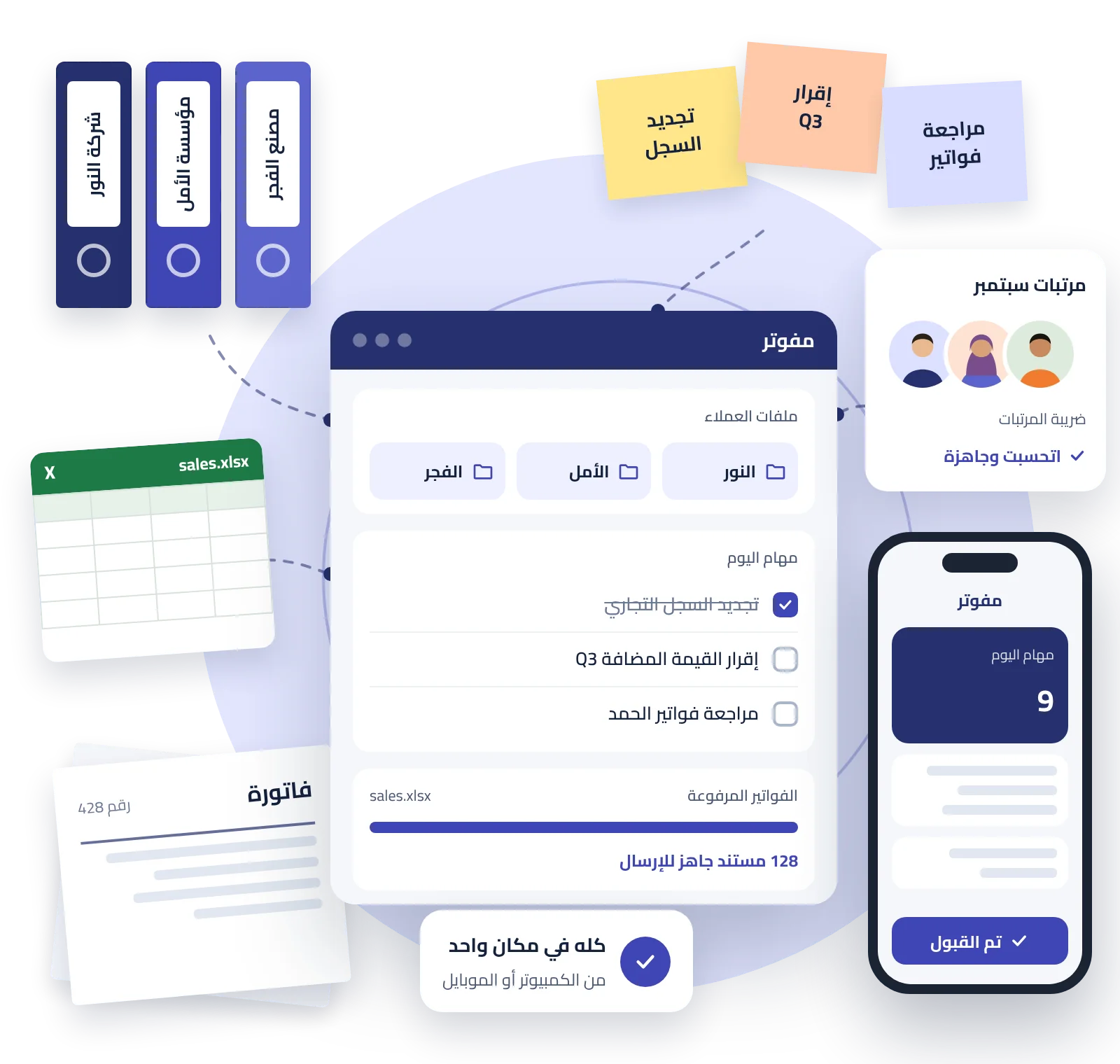
Mofawtar brings client files, tasks, invoices, and tax reports together in one platform for accounting firms, so you can manage the office easily from desktop or mobile. You can also refer to the Mofawtar User Guide for step-by-step instructions.

  • Organized client files
  • Automated tasks & reminders
  • Upload invoices from Excel
  • Payroll tax & payments
✓14-day money-back guarantee ✓From 1 to 100 tax files
مفوتR يجمع مهام مكتب المحاسبة وملفات العملاء والفواتيR وملفات Excel وضRيبة المRتبات في بRنامج واحد يعمل على الموبايل
Join accounting & tax professionals Accounting firms and businesses use Mofawtar every day.
1,300Tax file
120Accounting firm
9MMillion receipts & invoicesSales & purchases
Accountants come first

Mofawtar does not replace the accountant… It makes the accountant's work easier

The accountant remains the expert, decision-maker, and trusted advisor to the client. Mofawtar handles repetitive work so you can focus your time on the tasks that require professional judgment.

Your role as an accountant

  • Review data and make the right tax decisions
  • Provide advice and build client trust
  • Follow up on returns and resolve complex cases

Mofawtar's role

  • Collect portal data and prepare reports
  • Remind you of deadlines and create tasks automatically
  • Archive documents, bulk-upload files, and organize client records
✓The result: less time on repetitive work… and more time to serve more clients.

All your accounting-firm tools in one workspace

Instead of switching between Excel files, team messages, portal follow-ups, and document folders, Mofawtar combines client management, daily follow-up, archiving, and reporting in one clear, easy-to-use system.

The system is designed for firms managing many clients that need to distribute work, control permissions, meet follow-up deadlines, and keep all client information in one place with clearer management visibility.

Tax reports ready for review & delivery

Turn tax-portal data into organized reports that help your firm review returns, prepare client files, and reduce manual sorting.

Accurate reports Without manual compilation

From portal data to a clear report

Instead of downloading many files and reviewing them manually, Mofawtar organizes tax data into a format ready for review and export.

  • VAT reports for sales and purchases in an organized, exportable format.
  • Prepare Form 41 data and review suppliers, amounts, and withholding rates easily.
  • Archive sales and purchase invoices with quick search by date, number, or party.
  • Reduce copying and manual-sorting errors when preparing monthly client files.
Try the reports now

Manage multiple tax files—from 1 to 100

Ideal for accounting firms managing multiple clients that need to distribute work, define user permissions, and track files in an organized way.

Many client files in one dashboard

Better organization for your accounting firm

Add client tax files, assign tasks to your team, and define each user's permissions so data stays organized and secure.

  • Manage from 1 to 100 tax files based on your firm's needs.
  • Add team members and link them only to the relevant files.
  • Set view, export, review, or admin permissions per user.
  • Reduce overlap between client files and protect each company's data within the firm.
Organize your firm files

Issue & review clients' receipts and invoices

With the optional package, your firm can monitor client receipt and invoice issuance and review statuses and alerts from the same platform.

Issue & review Without repeated logins

Track receipts & invoices from the same platform

Ideal for firms that want not only reports, but also visibility into whether clients are issuing receipts and invoices regularly.

  • Track submission, acceptance, and rejection statuses for client invoices and receipts.
  • Reports help identify clients who are up to date and those who are late in submitting.
  • Add the optional package based on each client's or file's needs.
  • Reduce reliance on scattered messages and external tracking files between the firm and clients.
Track your clients easily

Receive purchases and cancel sales invoices from the same platform

Manage daily tax-portal operations more easily: receive purchases, review suppliers, and handle sales-invoice cancellations when needed.

Tax procedures Faster and more organized

Receive, review, and cancel from one place

Instead of repeatedly logging into the portal for each client, keep key operations visible to your team with archiving and an activity log for review.

  • Receive purchase invoices and review supplier data and tax values.
  • Search purchases by supplier, date, tax number, or document number.
  • Cancel sales invoices from the same platform while retaining the operation context for follow-up.
  • An audit log shows who performed each action and when.
Start managing operations

You can subscribe through Egypt Trust branches

Complete your firm's Mofawtar subscription at the nearest Egypt Trust branch, or start your subscription online.

Official partnership

Automated tasks & team permissions

Turn recurring follow-ups into organized tasks and define the responsible person and permissions for each team member.

Automated follow-up Instead of relying on memory

The right task reaches the right person

Organize renewal dates and recurring follow-ups, and control who can see each file and what actions they can perform.

  • Create automatic tasks for renewals, deadlines, and recurring follow-ups.
  • Assign tasks to team members and track them through completion.
  • Set each member's permissions based on their responsibilities.

Archiving & bulk upload

Keep each client's documents inside their file and bulk-upload invoices, receipts, and supporting files instead of handling them one by one.

Every document in the right place

Organized archiving & faster uploads

Keep client-related documents in one file and process batches of files and invoices to save time and reduce errors.

  • Archive client documents and link them directly to the client file.
  • Bulk-upload files, invoices, and receipts.
  • Search and access documents faster during review.

E-portal task management

Organize client portal and e-service follow-ups so your team knows each portal's status and next action without confusion.

Client portals without scattered follow-up

Portal follow-up linked to the client file

Instead of scattered messages and files, keep each portal's status, required steps, and responsible team member in one organized place.

  • Track each client's portal status.
  • Assign the responsible person for every follow-up or action.
  • Reduce scattered follow-up across messages and files.

Payroll & periodic reports

Manage payroll data and prepare monthly, quarterly, and annual reports in one workflow.

Payroll & reports in one workflow

From employee data to periodic reports

Help your team organize payroll files and recurring client follow-ups without splitting data across multiple files.

  • Manage employee data and payroll components.
  • Prepare and track monthly and quarterly reports.
  • Compile annual data in a clear file for review.
Why Mofawtar?

A practical alternative to manual tax-portal compilation

Designed for accounting firms that need faster access to data, organized files, and better work distribution across the team.

NeedWith MofawtarTraditional method
Client file managementClient files, documents, and follow-ups in one dashboardSeparate files, links, and folders for each client
Automated tasks & team permissionsRecurring tasks, alerts, work assignment, and role-based permissionsManual follow-up, scattered messages, and unclear permissions
Archiving & bulk uploadArchive documents by client with bulk file and invoice uploadsDownload, upload, and save each file separately
E-portal task managementTrack each client's portals and the responsible team member inside the firmScattered follow-up among employees without a clear status view
Tax reportsVAT reports, Form 41, and data ready for review and exportManual compilation from Excel and multiple files
PayrollManage payroll and monthly, quarterly, and annual reportsSeparate files and manual calculations for each period
Invoice & receipt issuanceIssue, review, and track acceptance/rejection statuses from the same platformRepeated portal logins and external follow-up for each client
Purchases & cancellationsReceive and review purchases and manage cancellations from the same platformRepeated logins and processes spread across multiple places
Customer reviews

What accounting firms and accountants say about Mofawtar

Experiences from accounting firms and accountants using Mofawtar to organize client files, tax reports, and daily work.

★★★★★
We sincerely appreciate the platform's strong support for accounting firms and its smart, integrated services that make dealing with Egypt's e-invoicing system easier and more efficient.
Mohamed Fahmy MansourAccounting & Tax Consultancy
★★★★★
A very good application. The dashboard is easy to use, and the support engineers are responsive and continuously improve the app. An excellent, professional tool that serves accountants well.
Reda Kamal TawfikCertified Accountant
★★★★★
One of the best programs—easy to use, affordable, and backed by excellent support.
Elia AttiaAccounting & Financial Consultancy
Become a partner

Join Mofawtar's accounting-firm partners

Submit your details and your firm's information, and the Mofawtar team will contact you to understand your needs and recommend the best way to use the platform.

  1. 1Submit your details & firm information
  2. 2The Mofawtar team contacts you
  3. 3We prepare the right plan for your clients

Or contact us directly: support@mofawtar.com

If the form is not visible, message us on support@mofawtar.com and our team will contact you.

Frequently asked questions

Frequently asked questions about Mofawtar for Accounting Firms

Short answers about the key tools accounting firms need to manage clients and daily tax work.

How do notifications and e-portal management work?

Mofawtar helps organize follow-up alerts and deadlines and track each client's portals and e-services, while assigning a responsible team member for every follow-up.

Can Mofawtar issue invoices and receipts?

Yes. Depending on the activated service, you can issue and review e-invoices and e-receipts and track submission, acceptance, and rejection statuses from the same platform.

Are Mofawtar prices fixed or flexible for accounting firms?

Pricing is flexible based on the number of files and required services, so each firm can choose what fits its client base and tool requirements.

Which tax reports can Mofawtar help prepare?

Mofawtar helps organize and prepare VAT-report and Form 41 data, while archiving invoices, receipts, and other data needed for review and export.

How does Mofawtar support data security and confidentiality?

Mofawtar uses user permissions and links each team member only to the files they need, reducing unnecessary data access and helping the firm manage work in a more controlled way.

Equip your firm to manage client files more efficiently

Start using Mofawtar to organize client files, tasks, e-portals, reports, and payroll from one platform.

Scroll to Top